Discover how to use offline maps during hiking and trekking activities
to navigate without an Internet connection, follow GPX tracks,
and view your GPS position at any time.
Introduction
Offline maps allow you to continue navigating even when no data
connection is available, a common situation during trekking,
mountain hiking, and outdoor activities in remote areas.
During outdoor activities such as trekking, mountain biking or mountaineering,
the data connection may be unavailable or unstable.
For this reason, offline maps are an essential tool
for safe navigation.
By using maps stored locally on the device, it is possible
to display routes, waypoints, GPX tracks and GPS position
without depending on the mobile network.
Prerequisites
GPS receiver or smartphone with GPS enabled
Maps downloaded in advance onto the device
Optional GPX tracks or waypoints for navigation
Topics covered
Why use offline maps
Types of maps for hiking
Preparing maps before departure
Using GPX tracks offline
Battery management during navigation
Why use offline maps
In mountain areas or remote routes, data coverage
may be limited or completely unavailable.
Offline maps allow you to continue navigating
even without an Internet connection.
This solution increases the reliability of outdoor navigation
and reduces the risk of losing orientation during the hike.
Types of Offline Maps
Offline maps can be raster or vector.
Raster maps are often derived from topographic cartography,
while vector maps allow smooth zooming
and generally smaller file sizes.
Offline maps can also be obtained by downloading locally
a portion of a Web map. To learn more about how the
main Web mapping services work and how to use them with OkMap,
see the article
Web Maps: how they work and how to use them.
For hiking and trekking, topographic maps with contour lines,
trails and elevation details are
particularly useful.
Preparing maps before departure
Before starting a hike, it is important to download
all the required maps and verify that they are available offline.
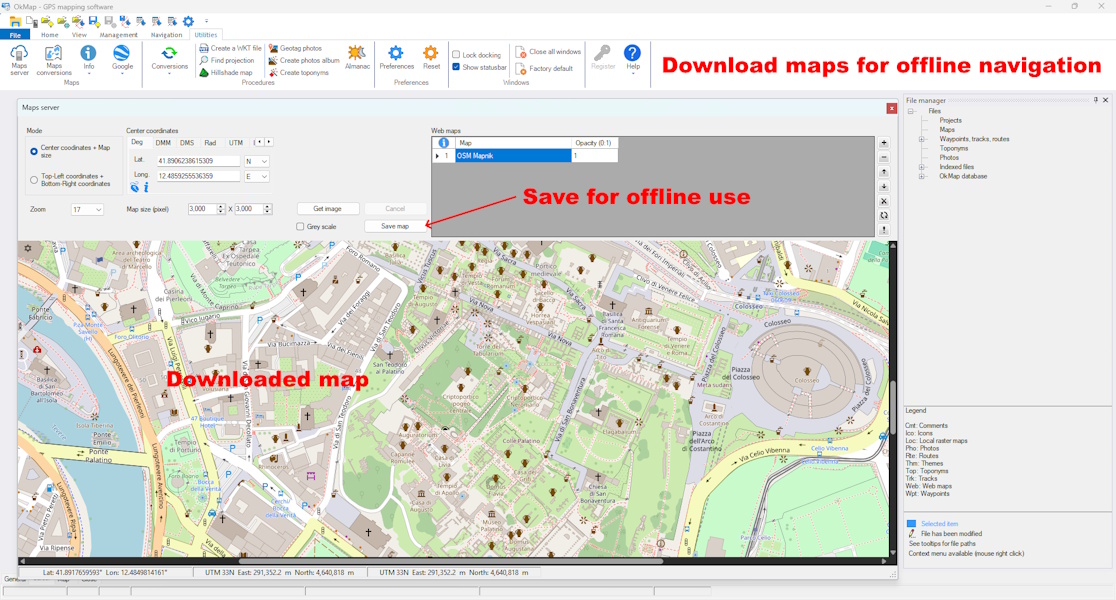
With OkMap, you can download web maps and save them locally for use even without an Internet connection.
It is also advisable to check the presence of
GPX tracks,
waypoints and elevation data required for navigation.
Offline navigation with GPX
GPX tracks can be used together with offline maps
to accurately follow hiking routes.
With tools such as OkMap, it is possible to display
your GPS position directly on the map,
comparing it with the planned track.
Do offline maps work without an Internet connection?
Yes. Once downloaded to the device, offline maps can be
used without an Internet connection. The GPS continues to work
normally and allows you to view your position on the map.
Which offline maps are best for hiking?
For hiking and trekking, topographic maps are particularly useful
because they show trails, contour lines, elevations, and other
terrain details.
Is it possible to follow a GPX track offline?
Yes. GPX tracks can be loaded onto the device and displayed
over offline maps, allowing navigation even when no data
connection is available.
Do offline maps consume battery power?
Offline maps consume very little power. Most battery
consumption is caused by the continuous use of the GPS receiver and
the screen during navigation.
Summary
Offline maps are an essential tool
for trekking and hiking in areas without data coverage.
Properly preparing maps and GPX tracks allows you
to face outdoor activities more safely and efficiently.
Do you want to apply these concepts with OkMap?
After reading the technical articles, you can deepen your knowledge with practical video tutorials
or download OkMap Desktop and work directly with maps, GPX tracks and GPS data.