Preparing the Raster Map
Before starting the georeferencing process, it is important to ensure that the raster map is of good quality. The image should be sharp, free from scanning distortions, and contain cartographic features that can be used as control points.
If the map has been obtained by scanning, it is advisable to use an adequate resolution and check that there are no folds, distortions or cropped areas that could compromise calibration accuracy.
Maps that include a kilometer grid, geographic coordinates along the borders, or other clearly identifiable cartographic references are particularly suitable.
The choice of control points directly affects the accuracy of the georeferencing process. When several alternatives are available, it is recommended to follow this order of preference:
- intersections of the projected coordinate grid (UTM, Gauss-Boaga, etc.);
- intersections of the geographic graticule (latitude and longitude);
- well-defined and easily identifiable features on the ground, such as geodetic survey markers, road intersections or bridges, only when the map does not include a coordinate grid.
When a map includes a coordinate grid, grid intersections are almost always the most accurate control points. Avoid using cartographic symbols such as mountain huts, springs, churches or other features represented by icons, because, for readability reasons, they may be slightly displaced from their actual position.
In OkMap, the accuracy of control point placement can be improved by using an appropriate zoom level or the magnifying tool. This is particularly useful when selecting grid intersections.
Selecting Ground Control Points (GCPs)
Ground Control Point (GCP) are locations on the map whose geographic coordinates are known with precision. They provide the link between the raster image and the real-world reference system, allowing the software to compute the transformation required to georeference the map.
When the map includes a projected or geographic grid, grid intersections usually provide the best Ground Control Points, because their coordinates are printed directly on the map. Only when no grid is available should you use clearly identifiable features such as geodetic survey markers, bridges or road intersections.
It is preferable to avoid features whose mapped position may only be approximate, such as mountain huts, springs, isolated buildings or other conventional map symbols. Although they are easy to recognize, they do not always coincide with their actual location and may reduce the accuracy of the georeferencing process.
For accurate georeferencing, it is important to distribute the GCPs across the entire map rather than concentrating them in a single area. A uniform distribution allows the software to compensate more effectively for any distortions in the original map.
Assigning the Correct Coordinates
After identifying the Ground Control Points, you must assign the correct coordinates to each one using the map's reference system. The coordinates may be expressed, for example, as latitude and longitude or in the UTM coordinate system, provided they are consistent with the map being used.
Choosing the wrong datum, map projection or coordinate system can shift the entire map away from its real position. For this reason, you should always verify the information printed on the map before starting the calibration process.
Once the control points and their corresponding coordinates have been entered, the software automatically computes the geometric transformation required to align the image with the selected reference system.
Checking Calibration Accuracy
After georeferencing, it is advisable to check the quality of the calibration obtained. A good distribution of the Ground Control Points (GCPs) and low error values contribute to obtaining a map correctly aligned with geographic reality.
OkMap calculates the georeferencing error of each control point. The map information reports the error of each individual GCP, the minimum value, the maximum value and the RMS error (Root Mean Square error), which provides an overall measure of the errors of the control points.
When editing GCPs, OkMap also displays the error directly in the point's information box. If the error exceeds the threshold set in Preferences - Georeferencing, the point is highlighted with a specific icon, making it immediately possible to identify points with an error exceeding the configured limit.
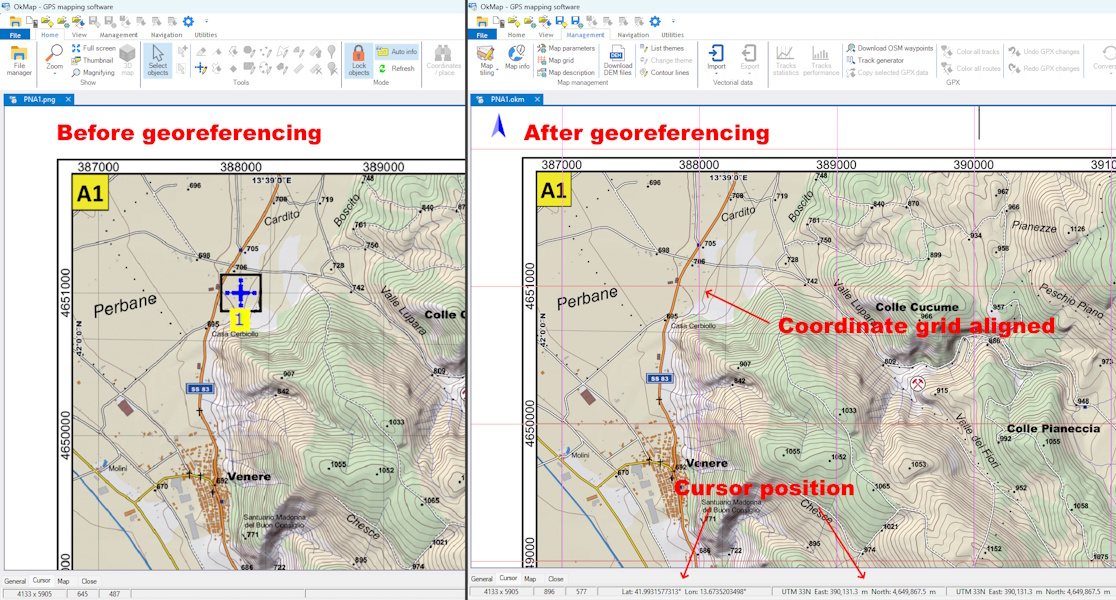
Error values provide an initial quantitative check of the calibration, but they should be complemented by some visual checks. If the original map contains a metric or geographic grid, it is possible to overlay the grid generated by the coordinate system used on the georeferenced map. The coincidence between the two grids allows you to visually verify the correctness of the georeferencing in different areas of the map and identify any shifts or deformations.
Another check consists of comparing the map with independent and reliable geographic data, such as GPX tracks, waypoints, already georeferenced maps or satellite imagery. For example, by viewing the map in Google Earth and adjusting the transparency of the overlay, it is easy to compare recognizable features such as roads, waterways, coastlines, buildings or other details of the terrain.
It is important to perform these checks in different areas of the map and not only at the GCPs used for calibration. Good agreement at the control points does not rule out the presence of errors or deformations in other parts of the map.
High or unusually distributed errors may indicate an incorrect choice of control points, incorrect coordinates, an inappropriate reference system, or deformations present in the original map. The distribution of GCPs over the entire map area therefore remains essential for obtaining a reliable calibration.
Using Georeferenced Raster Maps
Calibrated maps can be used to display GPX tracks, waypoints and outdoor routes with geographic accuracy.
This makes it possible to integrate historical maps, scanned hiking maps and custom images into GPS software.
Georeferencing Maps with OkMap
OkMap provides all the tools needed to georeference raster maps using Ground Control Points (GCPs), supporting a wide range of coordinate systems, geodetic datums and map projections.
During calibration, the software guides the user through entering the control points, automatically computes the geometric transformation and allows the result to be verified by overlaying the map with GPX tracks, waypoints and other geographic data.
Once georeferencing has been completed, the map can be used for navigation, GPS track analysis, route planning and the creation of custom maps, while maintaining proper alignment with other geographic data.