Discover how to analyze GPX tracks, obtain travel statistics,
study elevation profiles, and manage GPS files using advanced editing tools.
Introduction
GPX track analysis allows you to transform a simple GPS recording
into useful information for evaluating performance, route difficulty,
travel times, and elevation characteristics.
GPX files represent a widely used standard
for recording GPS tracks during hiking,
trekking, mountain biking, running and outdoor activities.
GPX track analysis makes it possible to obtain detailed information
about traveled distance, times, speed, elevation gain
and elevation profile of the route.
Prerequisites
GPX files recorded with GPS devices or smartphones
Each track point can include
geographic coordinates,
elevation, a timestamp, and other information
useful for route analysis.
GPS track statistics
Statistical analysis of GPX tracks makes it possible to calculate
total distance,
duration, average speed,
total ascent and descent.
To learn more about how positive elevation gain is calculated
and why different software can provide different values,
see the article
GPS Tracks: how is elevation gain calculated?.
These data are particularly useful
for evaluating sports performance,
route difficulty
and travel times.
Elevation analysis and elevation profiles
Elevation profiles allow you to visualize
elevation changes along the route.
Using
DEM
data it is possible to correct
GPS altitudes and obtain elevation analyses
that are more accurate and stable.
Managing and editing GPX tracks
GPX files can be edited to
correct errors,
remove anomalous points,
merge segments or split long routes.
Organized track management also makes it possible
to archive hikes,
compare different routes
and create custom collections of itineraries.
Analyzing tracks with OkMap
OkMap allows you to display GPX tracks
on raster maps and topographic cartography,
with advanced editing and analysis tools.
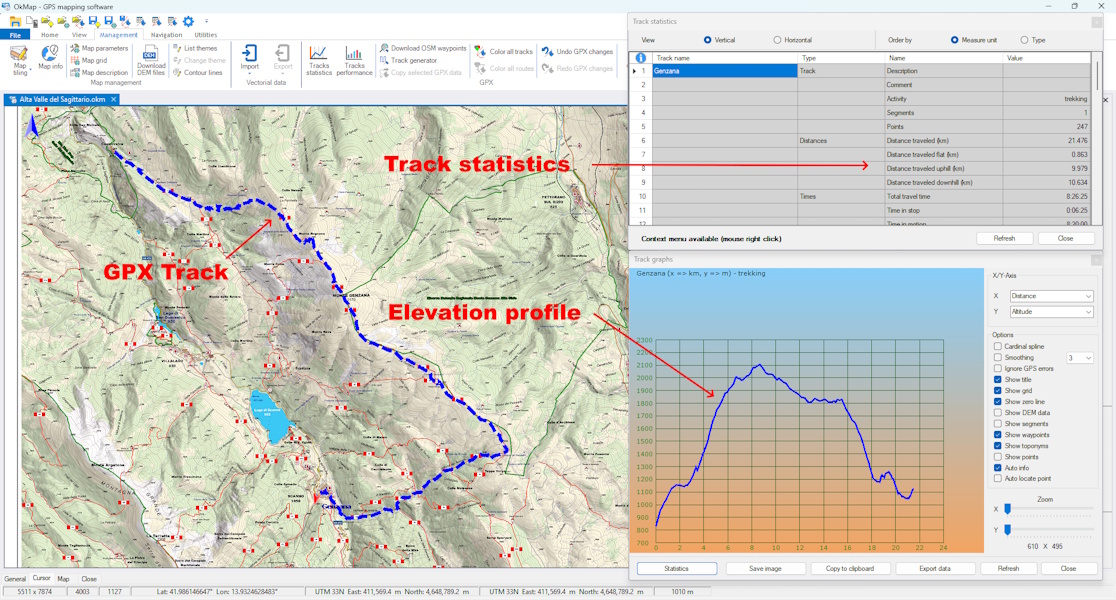
OkMap combines the GPX track displayed on the map, detailed route statistics,
and the elevation profile in a single window, providing a comprehensive
analysis of the route.
The software makes it possible to obtain detailed statistics,
display elevation charts,
correct elevations
and compare multiple GPS tracks simultaneously.
Practical tips
Always check the quality and completeness of the GPX file
Correct elevations using reliable DEM data
Archive tracks with easily recognizable names and dates
Compare multiple recordings to verify possible GPS errors
A GPX track is a sequence of GPS points recorded during an outdoor
activity. Each point may contain geographic coordinates, elevation,
and time information used for route analysis.
What information can be obtained from a GPX track?
Analyzing a GPX track makes it possible to calculate traveled distance,
duration, speed, elevation gain, elevation profile, and other statistics
useful for evaluating the route.
Why should GPS elevations be corrected?
Elevations recorded by GPS may contain significant errors.
Using DEM data allows more accurate elevation profiles
and more reliable elevation statistics.
Is it possible to compare multiple GPX tracks?
Yes. Comparing multiple GPS tracks makes it possible to analyze different routes,
verify route variations, and compare recorded times, distances,
and elevation gains.
Summary
GPX track analysis makes it possible to obtain detailed information
about routes, times, elevation and outdoor performance.
Proper management of GPS files
helps improve quality,
organization and reliability of recorded data.
Do you want to apply these concepts with OkMap?
After reading the technical articles you can learn more through practical video tutorials
or download OkMap Desktop and work directly with maps, GPX tracks and GPS data.