Discover how to clean and correct GPS tracks by removing errors, noise, and
outlier points from GPX files to obtain more accurate and reliable data.
Introduction
Cleaning GPS tracks is an important step in outdoor data analysis.
Correcting errors and anomalies allows you to obtain more reliable statistics,
more realistic elevation profiles, and a better representation of the recorded route.
GPS tracks recorded during hiking, trekking,
running or outdoor activities may contain errors caused
by satellite reception issues, multipath effects,
natural obstacles or GPS receiver limitations.
These problems often generate anomalous points,
artificial zig-zags, incorrect elevations and overestimated distances.
Proper track cleaning makes it possible to obtain
more accurate analyses and more realistic routes.
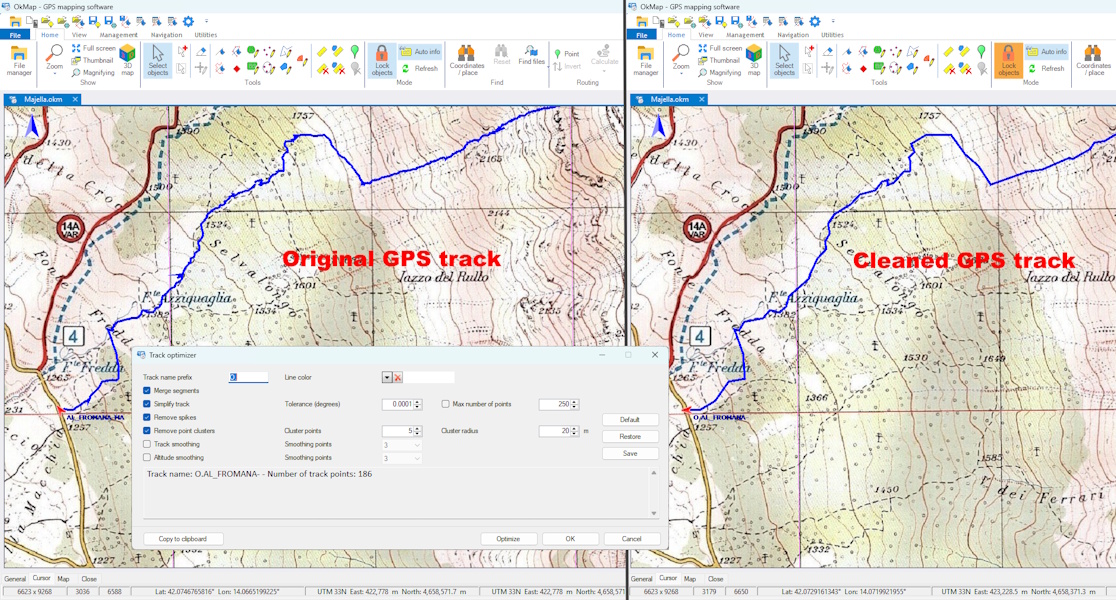
Comparison between an original GPS track (left) and the same track after the
cleaning process (right), with outliers removed
and the route optimized.
Prerequisites
GPX files recorded with GPS or smartphone
Software for editing and analyzing GPS tracks
Basic knowledge of outdoor navigation
Topics covered
Causes of errors in GPS tracks
Removal of anomalous points and noise
Elevation correction using DEM
Reduction of GPS oscillations
Track analysis with OkMap
Why GPS tracks contain errors
Consumer GPS receivers may experience
positioning errors
caused by satellite geometry, buildings,
dense forests, rock walls or signal reflections.
Even when the user is stationary, the GPS may record
small position oscillations that produce
noisy tracks and artificially increased distances.
Cleaning anomalous points
Cleaning a GPX track consists of identifying
and removing incorrect or inconsistent points compared to the real route.
Anomalous points may show sudden jumps,
unrealistic speeds or evident deviations
from the track direction.
Correcting elevation data
Elevations recorded by GPS are often less accurate
than horizontal coordinates.
To improve the elevation profile, it is possible to use
DEM models
(Digital Elevation Model).
Replacing GPS elevations with DEM data
makes it possible to obtain more stable elevation graphs
and to analyze elevation gain using
an elevation source independent of the GPS recording.
To learn more about calculating elevation gain in GPS tracks
and understand why different software can produce different results,
see the article
GPS Tracks: how is elevation gain calculated?.
Reducing GPS noise
Track filtering makes it possible to reduce
random GPS position oscillations.
This operation improves track readability,
reduces artificial zig-zags
and makes distance and speed more realistic.
Using OkMap to correct tracks
OkMap allows manual editing of track points,
correction of elevation data and comparison of the track
with raster maps or topographic cartography.
The editing tools also allow
removal of incorrect segments,
merging of multiple tracks
and improvement of the overall GPX data quality.
Practical tips
Always check the track before analyzing it
Correct elevations using reliable DEM data
Remove points with evident position jumps
Optimize the track by removing redundant points, clusters and anomalies before calculating elevation gain
Use topographic maps as a visual reference
Common mistakes
Considering GPS recordings as perfectly accurate
Ignoring elevation errors during analysis
Applying overly aggressive filters
Editing the track without comparing it with the map
GPS tracks may contain errors caused by satellite reception issues,
multipath effects, natural obstacles, satellite geometry,
and limitations of the GPS receiver.
How can outlier points be removed from a GPX track?
Outlier points can be removed using editing and filtering tools
that help identify sudden jumps, unrealistic deviations,
and speeds that are inconsistent with the actual route.
Why should elevation data be corrected?
Elevations recorded by GPS are generally less accurate than horizontal
coordinates. Using DEM data makes it possible to obtain more stable
elevation profiles and more accurate elevation gain analyses.
Is it possible to correct a GPX track after recording?
Yes. GPX tracks can be edited, filtered, and corrected after recording
to remove errors, improve data quality, and obtain more realistic
representations of the route.
Summary
Cleaning GPS tracks makes it possible to improve
accuracy, elevation data and the overall quality of GPX data.
Correcting anomalous points and GPS noise
allows more reliable outdoor analyses
and more realistic routes.
Do you want to apply these concepts with OkMap?
After reading the technical articles you can learn more through practical video tutorials
or download OkMap Desktop and work directly with maps, GPX tracks and GPS data.