OkMap Mobile Features
OkMap Mobile is a GPS navigation app for Android designed for outdoor navigation, GPX file management and offline map usage.
It allows you to record GPS tracks, follow routes, manage waypoints and use elevation data directly on your smartphone or tablet.
It is ideal for hiking, trekking, mountain biking, geocaching, off-road adventures and search and rescue operations.
Offline and Online Maps
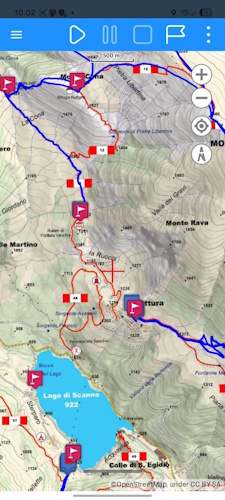
Use offline and online maps to view your position, plan routes and navigate even without an Internet connection. OkMap Mobile supports custom MBTiles maps and numerous online map services, allowing you to use topographic maps, satellite imagery and street maps directly on your Android device.
Maps can be prepared with OkMap Desktop or obtained from various compatible web services. During navigation you can display coordinates, map grids, elevation data and advanced geographic information.
Key features:
- MBTiles
- TMS
- WMS
- OSM
- ESRI
- Custom maps
GPS Navigation and Tracking
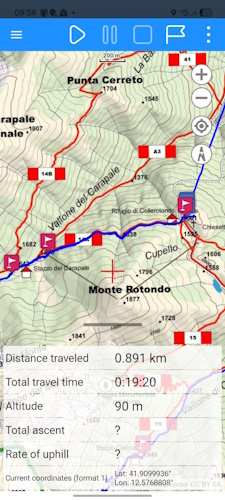
Record your outdoor activities and follow routes, GPX tracks and waypoints directly from your smartphone. OkMap Mobile uses the device GPS to provide real-time navigation information and accurately record movements during hiking, trekking, mountain biking, off-road driving and other outdoor activities.
Waypoint proximity alerts, off-route alarms and destination navigation help you stay on course and reach points of interest safely and easily.
Key features:
- Track recording
- Waypoint navigation
- Route navigation
- Off-route alarm
- Proximity alerts
- Anchor alarm
- Background operation
GPX Files, Waypoints, Tracks and Routes
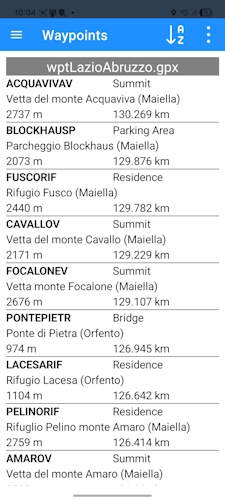
OkMap Mobile works with GPX files, the standard format for GPS waypoints, tracks and routes used by most GPS devices and outdoor navigation applications.
Files can be easily imported, exported and shared with other devices or with OkMap Desktop.
Waypoints, tracks and routes can be created, edited and managed directly on the map. Search, sorting and filtering tools are also available to organize large amounts of GPS data.
Key features:
- GPX import/export
- Waypoint editing
- Track editing
- Route editing
- Filters
- Sorting
Track Analysis and Elevation Data
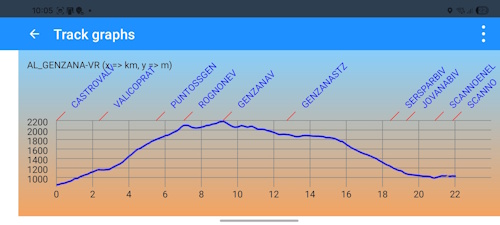
Analyze your GPS tracks using detailed statistics, charts and elevation profiles. OkMap Mobile calculates distance, elevation gain, speed, estimated travel time and many other parameters useful for evaluating performance and planning new outdoor activities.
Integration with DEM and SRTM elevation data allows automatic assignment of elevations to waypoints and tracks, providing more accurate information about the terrain.
Key features:
- Statistics
- Charts
- DEM
- SRTM
- Elevation gain
- Estimated times
Trip Computer and Compass
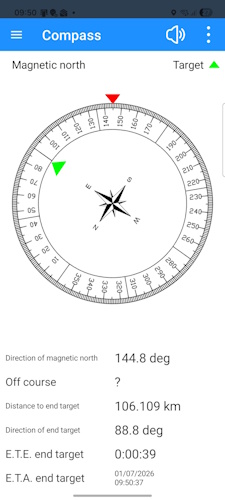
During navigation you can display more than 60 configurable indicators showing speed, distance, altitude, direction, time and many other useful values. The trip computer turns your smartphone into a complete outdoor navigation tool.
The integrated compass displays north direction, destination direction and other orientation information. A voice guidance function is also available to assist users during navigation.
Key features:
- More than 60 indicators
- Compass
- Voice guidance
- Customizable indicators
OpenStreetMap and Online Services
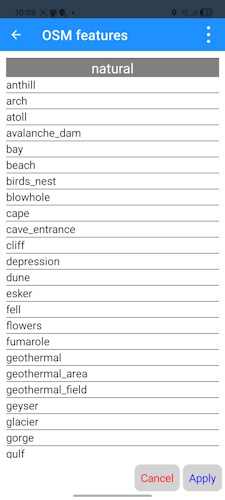
OkMap Mobile integrates several online services to enhance the navigation experience and simplify the search for points of interest. You can perform geographic searches, use geocoding and reverse geocoding, and quickly access external services dedicated to outdoor activities.
The app also allows downloading waypoints from OpenStreetMap using predefined categories or custom filters, making it easy to find shelters, springs, parking areas, mountain peaks, viewpoints and other useful points of interest (POIs) during outdoor adventures.
Downloaded waypoints are displayed directly on the map and can be used for navigation, trip planning and the creation of new routes.
Key features:
- OSM waypoint download
- Geocoding
- Reverse geocoding
- Google Maps
- Geocaching
- PeakFinder
Complete Features
Maps
- Custom offline maps in MBTiles format
- Online maps from various TMS and WMS web servers (Google, Apple, OpenStreetMap, ESRI, Nokia, etc.)
- Addition of custom web map servers
- 6 customizable navigation and status indicators (selected from more than 60)
- Coordinates in different datums and formats: degrees, degrees-minutes, degrees-minutes-seconds, UTM, GeoRef, USNG, BNG, IG, metric coordinates based on many map projections
- Zoom to: GPX data, copied coordinates
- Modes: follow user position, distance and area calculation
- Grids: geographic, metric and DEM data grids
- Find: waypoint, track, route, address, coordinates
- Reverse geocoding
- Waypoint generation
- Download and management of DEM elevation data from the SRTM project
- Integration with: Google Maps, Geocaching.com, Peakfinder.org
- Download waypoints from OpenStreetMap
- Create and edit waypoints, tracks and routes directly on the map
Navigation
Trip Computer
- Trip computer with more than 60 navigation and status indicators
Compass
- 6 customizable navigation and status indicators (selected from more than 60)
- Graphical compass showing north and destination direction
- Voice guidance when pointing the device
Waypoints, Tracks and Routes
- Various types of lists
- Edit and delete functions
- Sorting and filtering functions
- Detailed information pages
- Track charts
- Track statistics
- Reverse track and route
- Automatic elevation assignment
- Estimated travel time function
Utilities
- GPX file list
- Custom maps list
- Downloaded DEM file list
- Web maps list
- Datum list
- Projection list
- Preferences
- Restore factory settings
- Information and links
- Download the online manual

Plan your routes with OkMap Desktop
Do you use OkMap Mobile during your outdoor activities? Organize waypoints, edit GPX files, plan routes, georeference maps and analyze GPS tracks on your Windows PC with OkMap Desktop.
Articles and Guides
Learn more about OkMap features through technical articles and practical guides.
You'll find examples, tips and detailed procedures dedicated to GPS navigation, track analysis,
route planning and map management.