Discover how to create Garmin Custom Maps in KMZ format using georeferenced raster maps
and use them on compatible Garmin GPS devices.
Introduction
Garmin Custom Maps allow users to load custom raster maps onto Garmin GPS devices
that are not available in standard cartography.
This feature is particularly appreciated by hikers,
cyclists, geocachers, and professionals who need to use
specific maps in the field.
Garmin devices compatible with Custom Maps
allow the display of custom raster maps
overlaid on traditional GPS cartography.
This feature is particularly useful
for using scanned hiking maps,
historical cartography,
orthophotos, or custom technical maps
directly on the outdoor GPS device.
Prerequisites
A georeferenced raster map
A Garmin device compatible with Custom Maps
Software for exporting to KMZ format
Topics Covered
Garmin Custom Maps KMZ format
Preparing the raster map
KMZ export and optimization
Transferring the map to the Garmin device
Device limitations and compatibility
What Garmin Custom Maps Are
Garmin Custom Maps are georeferenced raster maps
stored in KMZ format,
compatible with many Garmin outdoor GPS devices.
The KMZ file contains the map images
and their related geographic coordinates,
allowing the device
to correctly display the cartography on the terrain.
The scan quality,
the accuracy of the
georeferencing,
and the readability of the cartography
directly affect the final result on the GPS device.
Exporting the Map in KMZ Format
The software generally divides the map
into raster tiles compatible with Garmin limits
and automatically generates the final KMZ file.
To improve device performance,
it is recommended to optimize image size,
resolution, and the number of exported tiles.
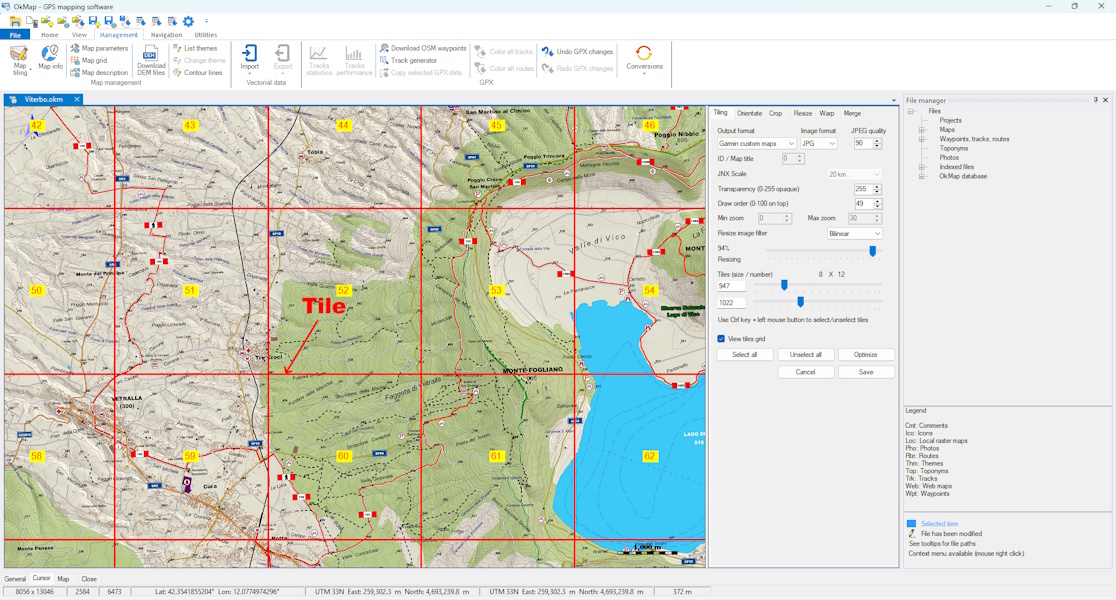
During export, OkMap automatically divides the georeferenced map
into tiles compatible with the Garmin Custom Maps format,
optimizing the size and number of images included in the KMZ file.
Transferring the Map to the Garmin GPS
The KMZ file must be copied
into the dedicated folder of the Garmin device,
usually named "CustomMaps".
After the transfer,
the map will be available directly on the GPS device
and can be used together with waypoints,
GPX tracks,
and other installed maps.
Limitations of Garmin KMZ Maps
Garmin devices impose limits
on the number of raster tiles,
image size,
and the total amount of loadable data.
For this reason, it is often necessary
to reduce map resolution
or split large cartographic areas
into multiple separate files.
Creating Garmin Maps with OkMap
OkMap includes a dedicated function for creating Garmin Custom Maps,
allowing georeferenced raster maps to be exported directly to the
KMZ format compatible with many Garmin GPS devices.
The software automatically manages map tiling,
image optimization, and the generation of the required files,
significantly simplifying the Custom Maps creation process.
Practical Tips
Use georeferenced maps with good accuracy
Reduce image size to improve performance
Check compatibility with your Garmin model
Split large areas into multiple KMZ maps
Common Mistakes
Exceeding the tile limits supported by the GPS device
A Garmin Custom Map is a georeferenced raster map
stored in KMZ format and viewable on compatible Garmin devices.
Which maps can be converted to KMZ?
Georeferenced raster maps such as topographic maps,
hiking maps, orthophotos, and scanned maps can be used.
Why is a KMZ map not displayed on a Garmin GPS device?
The problem may be caused by device limitations,
georeferencing errors, excessive file size,
or placing the file in the wrong folder.
Can OkMap create Garmin Custom Maps directly?
Yes. OkMap includes dedicated tools for exporting georeferenced raster maps
to Garmin KMZ format.
Recognition
OkMap was mentioned by Garmin Italy in a
Official Technical Guide dedicated to the creation of Garmin Custom Maps.
Summary
Garmin Custom Maps in KMZ format
allow the use of custom raster cartography
on Garmin outdoor GPS devices.
Proper georeferencing
and image optimization
make it possible to obtain accurate,
lightweight maps perfectly usable during outdoor activities.
Want to apply these concepts with OkMap?
After reading the technical articles, you can continue learning with practical video tutorials
or download OkMap Desktop and work directly with maps, GPX tracks, and GPS data.